
Introduction
If you want your website to appear higher on Google, you need good on-page SEO. Every day, millions of people search online for products, services, and information. If your web pages are well optimized, they have a better chance of reaching those people.
On-page SEO is one of the most important parts of search engine optimization. It helps search engines understand your content and improves the experience for your visitors. Unlike paid advertising, good on-page SEO can bring free traffic to your website over time.
The best part is that you do not need to be an SEO expert to improve your pages. By following a few simple steps, you can make your content easier to read, easier to understand, and more valuable for both users and search engines.
In this guide, you will learn how to improve your website step by step. Whether you are a beginner, a blogger, a small business owner, or a digital marketer, these tips will help you build stronger web pages and improve your search rankings.
What Is On-Page SEO?
On-page SEO is the process of optimizing the content and elements on a webpage. The goal is to help search engines understand your page and show it to people who are searching for related information.
Everything you can change on your own webpage is part of on-page SEO. This includes your page title, headings, content, images, internal links, URL, and meta description.
Good on-page SEO makes your pages more useful. It also helps visitors find the answers they need without confusion.
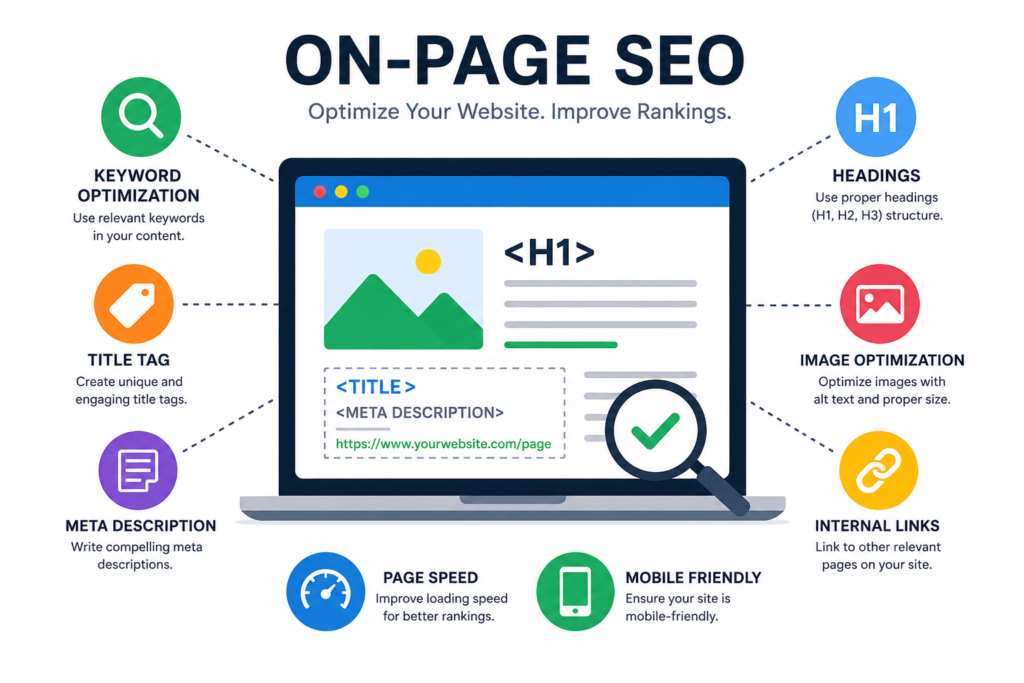
Why Is On-Page SEO Important?
Search engines want to show the best results for every search. If your page is helpful, easy to read, and well organized, it has a better chance of ranking higher.
Good on-page SEO offers many benefits.
- It increases organic traffic.
- It improves your Google rankings.
- It creates a better user experience.
- It keeps visitors on your website longer.
- It helps generate more leads and sales.
- It supports your overall SEO strategy.
Even small improvements can make a noticeable difference over time.
Step 1: Find the Right Keyword
Every successful SEO page starts with keyword research.
A keyword is the word or phrase that people type into Google.
For example, if you are writing this article, your main keyword is On-Page SEO Guide: Improve Rankings Step by Step.
Choose one primary keyword for each page. Then add a few related keywords naturally throughout your content.
When selecting keywords:
- Choose words your audience actually searches for.
- Focus on topics that match your business.
- Look for keywords with reasonable competition.
- Think about what users want to learn.
Good keyword research helps you create content that answers real questions.
Step 2: Create an SEO-Friendly Title
Your page title is one of the first things people see in Google search results.
A strong title encourages users to click your page.
A good SEO title should:
- Include your main keyword.
- Explain the topic clearly.
- Be easy to read.
- Stay around 50–60 characters when possible.
Instead of writing a vague title, make it specific and useful.
Example:
On-Page SEO Guide: Improve Rankings Step by Step
This title tells readers exactly what they will learn. For More information visit website onlinemarketingagencys.com
Step 3: Write a Clear Meta Description
A meta description is a short summary of your page. It appears below the title in search results.
Although it does not directly improve rankings, it can increase your click-through rate.
A good meta description should:
- Include the main keyword.
- Explain the page in simple words.
- Encourage users to visit your website.
- Stay between 150 and 160 characters.
Write every meta description for people first.
Step 4: Use a Simple URL
Your URL should describe your page.
Keep it short and meaningful.
Good example:
yourwebsite.com/on-page-seo-guide
Poor example:
yourwebsite.com/page?id=67589
Simple URLs are easier to remember and easier for search engines to understand.
Step 5: Organize Content with Headings
Headings help readers scan your content quickly.
They also help search engines understand your page structure.
Use only one H1 heading for each page.
Use H2 headings for your main sections.
Use H3 headings for smaller topics under each section.
A clear structure makes your article easier to read.
Step 6: Write Helpful Content
Quality content is the foundation of on-page SEO.
Write content that answers your readers’ questions.
Avoid writing only to include keywords.
Instead:
- Explain ideas clearly.
- Give useful examples.
- Solve real problems.
- Use facts when needed.
- Keep your information up to date.
Useful content keeps visitors on your website longer and encourages them to return.
Step 7: Use Keywords Naturally
Your keyword should appear naturally throughout the article.
You can include it in:
- The page title
- The first paragraph
- One or two headings
- Image alt text
- The conclusion
Do not repeat the same keyword again and again.
Google understands related words and phrases, so write naturally.
Step 8: Optimize Your Images
Images make your article more interesting.
They also improve user engagement.
Before uploading an image:
- Compress the file size.
- Give it a descriptive file name.
- Add helpful alt text.
- Choose high-quality images.
- Use the correct dimensions for your website.
Optimized images help pages load faster and improve accessibility for all users.
Step 9: Add Internal Links
Internal links connect one page of your website to another page on the same website. They help visitors find more useful information. They also help search engines understand your website structure.
For example, if you have another article about keyword research, add a link to it in this blog. This keeps visitors on your website longer and helps Google crawl your pages more easily.
Benefits of Internal Links
- Improve website navigation
- Increase page views
- Help search engines discover your pages
- Share SEO value between pages
- Reduce bounce rate
Always use meaningful anchor text. Instead of writing “Click Here,” use words that describe the linked page.
Step 10: Add External Links
External links point to trusted websites outside your own website.
These links show that your content is supported by reliable information. They also help readers learn more about the topic.
Only link to websites that are trustworthy and relevant. Avoid linking to low-quality or spam websites.
Do not add too many external links. Use them only when they improve your content.
Step 11: Improve Page Speed
Website speed is very important for SEO. People do not like slow websites. If a page takes too long to load, many visitors leave before reading the content.
Google also considers page speed when ranking websites.
Ways to Improve Page Speed
- Compress images before uploading them.
- Use fast web hosting.
- Remove unnecessary plugins.
- Reduce large files.
- Enable browser caching.
- Use a Content Delivery Network (CDN) if needed.
A faster website creates a better experience for your visitors.
Step 12: Make Your Website Mobile-Friendly
Today, most people use smartphones to browse the internet.
Your website should look good on every screen size.
A mobile-friendly website should:
- Load quickly
- Display clear text
- Have easy navigation
- Use buttons that are easy to tap
- Adjust automatically to different devices
Google uses mobile-first indexing. This means it mainly looks at the mobile version of your website when deciding rankings.
Step 13: Improve Content Readability
Visitors enjoy content that is easy to read.
Write short sentences.
Keep paragraphs short.
Use simple words whenever possible.
Add headings and bullet points to organize your content.
Avoid using difficult technical terms unless you explain them.
The easier your content is to read, the longer visitors will stay on your website.
Step 14: Optimize Images with Alt Text
Search engines cannot understand images the way people do. Alt text tells search engines what an image shows.
Good alt text also helps users who use screen readers.
For example, instead of writing:
Image1.jpg
Use alt text like:
“Person optimizing a website for on-page SEO.”
Write clear and descriptive alt text for every important image.
Step 15: Write Unique Content
Google values original and helpful content.
Write every article in your own words.
Focus on solving your readers’ problems.
Share useful tips, examples, and practical advice.
Do not copy content from other websites.
Fresh and useful content builds trust with both readers and search engines.
Step 16: Update Your Content Regularly
SEO is not a one-time task.
Search engines prefer websites that stay updated.
Review your articles every few months.
You can:
- Add new information.
- Update outdated examples.
- Improve headings.
- Fix broken links.
- Replace old images.
- Add links to your latest articles.
Regular updates keep your content useful and competitive.
Common On-Page SEO Mistakes
Many beginners make simple mistakes that hurt their rankings.
Try to avoid these common errors:
- Using the same keyword too many times
- Writing very short articles with little value
- Forgetting meta descriptions
- Ignoring image optimization
- Creating long and confusing URLs
- Using duplicate content
- Forgetting internal links
- Having a slow website
- Ignoring mobile users
- Not updating old content
Fixing these mistakes can improve your website over time.
On-Page SEO Checklist
Before publishing any page, make sure you complete these tasks:
✔ Choose one main keyword.
✔ Write a clear SEO title.
✔ Add a helpful meta description.
✔ Create a short URL.
✔ Use one H1 heading.
✔ Organize content with H2 and H3 headings.
✔ Write original and useful content.
✔ Add internal links.
✔ Include trusted external links.
✔ Optimize every image.
✔ Improve page speed.
✔ Check your website on mobile devices.
✔ Proofread your content.
✔ Publish and monitor performance.
This checklist helps you avoid common SEO problems.
Benefits of Good On-Page SEO
When you follow these steps, your website can enjoy many benefits.
These include:
- Better Google rankings
- More organic traffic
- Higher click-through rates
- Better user experience
- More page views
- Longer visitor sessions
- More leads and sales
- Stronger website authority
Good on-page SEO supports every part of your digital marketing strategy.
Conclusion
On-page SEO is one of the easiest and most effective ways to improve your website’s visibility in search engines. It helps Google understand your content and helps visitors find the information they need.
You do not need expensive software or advanced technical skills to get started. Focus on creating useful content, using your keywords naturally, writing clear titles and headings, improving page speed, optimizing images, and building a strong internal linking structure.
Remember that SEO takes time. You may not see results immediately, but consistent effort can bring steady growth. Every page you optimize makes your website stronger.
Use this On-Page SEO Guide: Improve Rankings Step by Step as a checklist whenever you publish a new page. By following these best practices, you can improve your rankings, attract more visitors, and build long-term success for your website.